


Angler phishing is when a scammer poses as a company’s customer support on social media. They watch for complaints, reply first from a lookalike account, and ask for your login, payment details, or personal information to “resolve” the problem. It works because you reached out first, so a fast, friendly reply feels like the help you asked for.
According to the FTC, nearly 30% of people who reported losing money to a scam in 2025 said it started on social media. Reported losses from all social media scams reached $2.1 billion, about eight times the 2020 figure. That’s every kind of social media scam, but impostor support accounts are one of the ways in.
How angler phishing works
Angler phishing is one type of phishing, where a scammer pretends to be someone you trust to get information or money. The name comes from the anglerfish, which dangles a lure to draw in prey. Here, your complaint is the lure: It tells the scammer which company to copy.
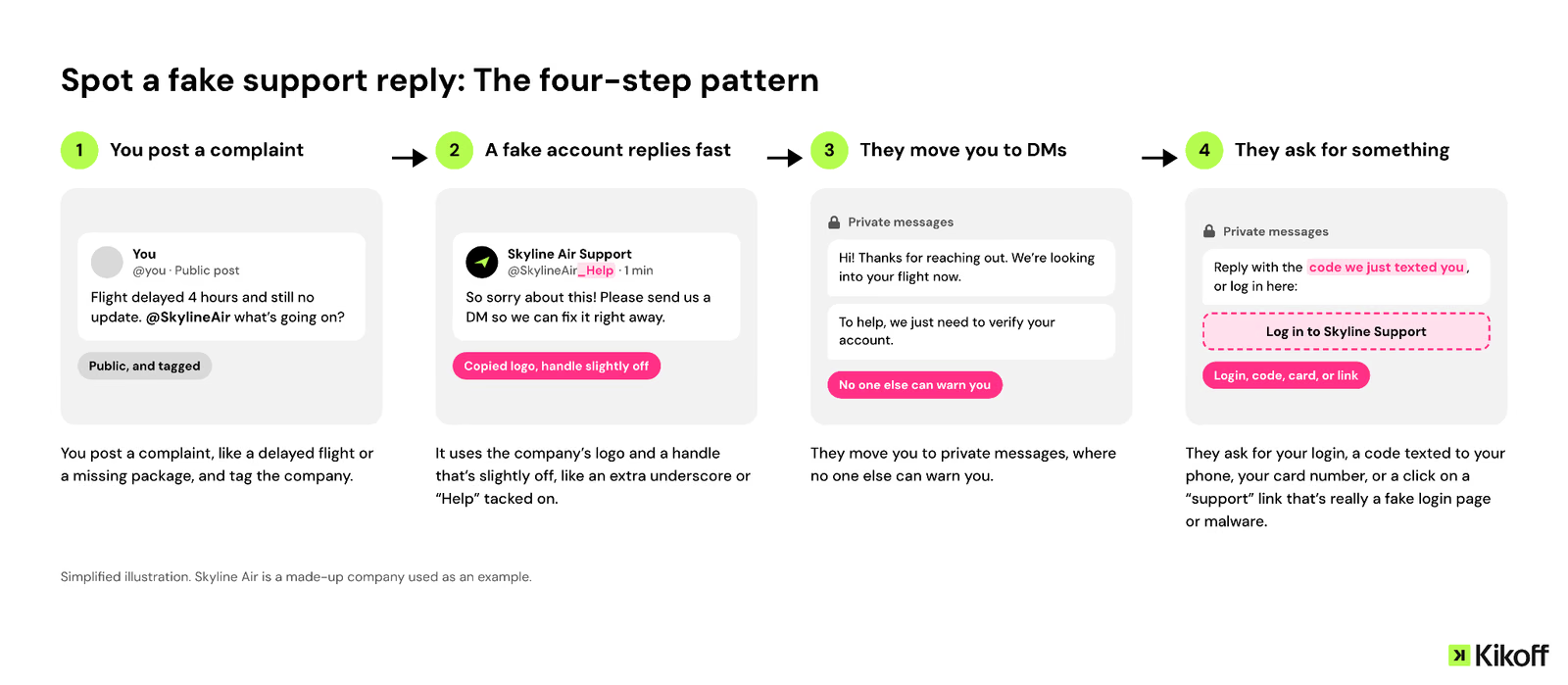
- You post a complaint, like a delayed flight or a missing package, and tag the company.
- A fake account replies fast. It uses the company’s logo and a handle that’s slightly off, like an extra underscore or “Help” tacked on.
- They move you to private messages, where no one else can warn you.
- They ask for something, such as your login, a code texted to your phone, your card number, or a click on a “support” link that’s really a fake login page or malware.
Read more >> What Is Phishing? Tips to Protect Yourself
How to spot a fake support account
Look at the account before you look at the offer.
A checkmark isn’t proof. Some platforms let anyone pay for one, so treat it as one clue among several.
If anyone asks for a code sent to your phone, stop. Whoever has that code can log in as you.
Read more >> How to Protect Your Online Banking Information
How to get help without taking the bait
The FTC recommends finding a company’s official social media page through its website and checking for a verification badge. Better yet, log in to the company’s app or website and use the chat or phone number listed there. The FTC also advises never giving out personal information on social media. In public posts, leave out your order number, email, and phone number.
Post the problem, not your details
“@SkylineAir My flight was canceled and I can’t rebook in the app. Can someone help?”
- Name the problem. Skip your order number, email, phone, and booking code.
- Finish the conversation in the company’s app or on its website.
- If someone replies, compare their handle with the one linked on the company’s website before you write back.
What to do if you already shared information
Act as soon as you can. The sooner you change a password or call your bank, the less time a scammer has to use what they got.
If you sent money, call your bank or card company (or the payment app or gift card company you used) right away and ask whether the payment can be stopped or disputed.
Then report it:
- Get a recovery plan. Report it at IdentityTheft.gov, and the FTC gives you steps based on what was taken.
- Report the scam to the FTC at ReportFraud.ftc.gov.
- Report the fake account to the platform, and tell the real company its name is being used.
Next, protect your credit. A credit freeze is free to place, and it lasts until you lift it. You place it with each of the three bureaus. A fraud alert is lighter: it’s free, lasts one year, and asks lenders to confirm it’s you before opening new credit. Contact one bureau, and it tells the other two. If your identity was stolen and you’ve reported it, an extended fraud alert lasts seven years.
Last, get your free credit reports each week at AnnualCreditReport.com and look for accounts you don’t recognize. Checking your own reports doesn’t affect your scores. Dispute any account you didn’t open with each bureau that lists it. Disputes are free and correct inaccurate information, including identity theft accounts. If you’d rather not write the letters yourself, Kikoff’s AI Credit Disputes drafts them for you with a few taps.
Read more >> How to Protect Yourself From Credit Card Fraud
Bottom line
Angler phishing works by answering your complaint before the real company does. Reach support through the company’s own website or app, and keep passwords, codes, and card numbers out of direct messages.
If you already shared something, place a freeze and file a report at IdentityTheft.gov today. A freeze keeps new accounts from being opened in your name, but it won’t tell you if someone tries. It’s also off whenever you lift it to apply for an apartment or a car loan.
Kikoff’s Credit Monitoring sends alerts when a new account or balance change shows up, so an account you didn’t open doesn’t go unnoticed. Premium watches all three bureaus for $20 a month, and plans start at $5.
Frequently Asked Questions
Article Sources
Disclaimer: The information provided in this blog post is meant for informational purposes only and does not constitute financial advice.