





Your bank account is effectively the front door to your financial life, and cybercriminals know it.
In 2026, online banking fraud is more sophisticated than ever, with scams, data breaches, and phishing attacks targeting everyday consumers across every income level. The good news is that protecting your online banking information doesn't require a tech background. It mainly comes down to a handful of consistent habits that make you a much harder target.
Let's jump in.
How to protect your online banking information
Protecting your online banking information starts with understanding where the vulnerabilities are.
Every individual who uses online banking has some level of exposure, be it a weak password, an unsecured network, or simply not knowing what a phishing attempt looks like. The steps below cover the full picture, from locking down your login credentials to monitoring your accounts for signs of fraud.
Use strong, unique passwords for every account
Your password is generally the first line of defense between a hacker and your bank account.
A strong password is usually at least 12 characters long and includes a mix of uppercase and lowercase letters, numbers, and symbols. Using the same password across multiple accounts is one of the single most common mistakes people make, because a breach on one site can expose all of your accounts at once.
A password manager like 1Password, Bitwarden, or Dashlane makes it easy to generate and store unique passwords for every account without having to memorize them all. This means you can have a different, complex password everywhere without the mental overhead.
Just make sure your password manager itself is protected with a strong master password and two-factor authentication.
Enable two-factor authentication
Two-factor authentication (2FA) is basically a second lock on your door.
Even if a cybercriminal gets your password, 2FA requires them to also have access to a second verification method, usually your phone, before they can log in. Most banks support 2FA via SMS text message, an authenticator app like Google Authenticator, or a hardware key.
Authenticator apps are generally more secure than SMS-based 2FA, since phone numbers can be hijacked through a technique called SIM swapping. This said, even SMS-based 2FA is significantly better than no 2FA at all.
Enable 2FA on every financial account you have, and check that it's turned on.
Avoid banking on public Wi-Fi
Public Wi-Fi networks, be it a coffee shop, airport, or hotel, are notoriously easy for attackers to exploit.
A technique called a "man-in-the-middle" attack allows a bad actor on the same network to intercept data being sent between your device and your bank's servers. This means any login credentials, account numbers, or transaction details you send over an unsecured network could potentially be captured.
If you need to access your bank account on the go, use your phone's cellular data connection instead. Luckily, mobile data is much harder to intercept than public Wi-Fi.
If you must use public Wi-Fi, a VPN (virtual private network) encrypts your traffic and adds a meaningful layer of protection.
Watch out for phishing scams
Phishing is effectively a con where an attacker impersonates a trusted institution to trick you into handing over your credentials.
These attacks usually arrive via email or text message and often look nearly identical to legitimate communications from your bank, complete with logos, formatting, and urgent language designed to pressure you into clicking a link. Every individual who has an email address is a potential target, regardless of how savvy they think they are.
Before clicking any link in a financial email, check the sender's actual email address, not just the display name. Banks will generally never ask you to verify your account details, reset your password, or confirm a transaction via a link in an email.
When in doubt, go directly to your bank's website by typing the URL into your browser, rather than clicking any link.
Keep your devices and apps updated
Software updates are mainly released to fix security vulnerabilities that attackers actively look for.
Running an outdated operating system or banking app is basically leaving a known unlocked window in your house. Manufacturers and developers patch these vulnerabilities quickly, but only users who update actually get the protection.
Enable automatic updates on your phone, tablet, and computer so you're never running outdated software. This applies to your banking apps as well, which should always be downloaded from official app stores and updated regularly.
Set up account alerts
Most banks allow you to set up real-time notifications for account activity, and using them is a no-brainer.
You can usually configure alerts for things like large transactions, logins from new devices, failed login attempts, and balance changes. This means you'll know immediately if something unusual happens, giving you the best chance to act quickly before damage spreads.
Log in to your bank's settings and enable every alert that's available. The faster you catch fraud, the easier it is to reverse it.
Monitor your credit for signs of fraud
Online banking fraud doesn't always stay in your bank account.
If a bad actor gets enough of your personal information, they can open new lines of credit in your name, which will show up on your credit report as unfamiliar accounts or hard inquiries. Checking your credit report regularly is one of the most effective ways to catch identity theft before it spirals.
You can pull your credit reports for free at annualcreditreport.com, and apps like Kikoff make it easy to monitor your credit and dispute any inaccurate items that appear as a result of fraud. Start building a positive credit history with Kikoff while keeping a close eye on any suspicious activity that surfaces.
What to do if your online banking information is compromised
If you suspect your online banking information has been compromised, speed is everything.
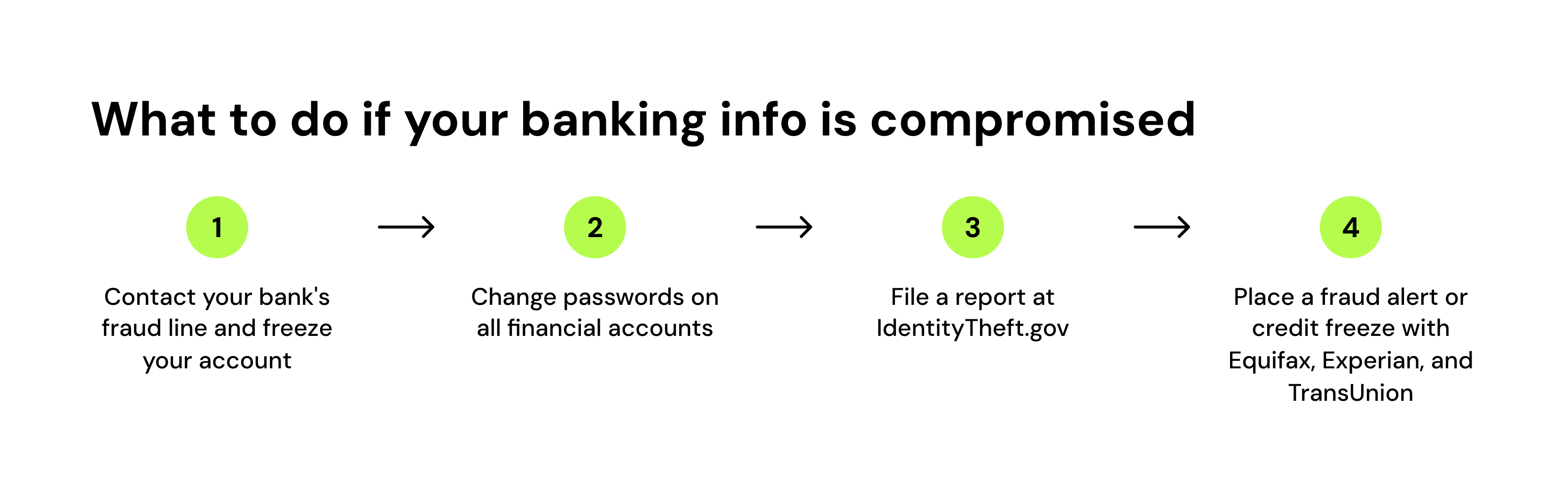
Contact your bank immediately and report the suspected fraud. Most banks have 24/7 fraud lines and can freeze your account, issue a new card, and begin an investigation within minutes of your call. The sooner you report it, the more likely you are to recover any lost funds.
Change your passwords on all financial accounts right away, starting with the account you believe was compromised. If you reused that password anywhere else, be it a different bank, a payment app, or an email account, change those too.
File a report at IdentityTheft.gov if you believe your personal information was exposed. The FTC's identity theft portal walks you through a personalized recovery plan step by step.
Finally, consider placing a fraud alert or credit freeze with the three major bureaus (Equifax, Experian, and TransUnion). A credit freeze is one of the most powerful tools available, effectively blocking any new credit from being opened in your name until you lift it.
Conclusion
Protecting your online banking information mainly comes down to a set of consistent habits: strong passwords, two-factor authentication, staying alert to phishing, and monitoring your accounts and credit regularly.
Every individual who banks online is a potential target, but most attacks are opportunistic and can be stopped with the right defenses in place. The steps above don't require technical expertise, just a bit of attention and follow-through.
If you want to keep an eye on your credit alongside your banking activity, Kikoff makes it easy to monitor your credit profile and dispute any inaccurate items. Add positive payment history to your credit profile with Kikoff while staying protected.
Frequently Asked Questions
About the editor

Disclaimer: The information provided in this blog post is meant for informational purposes only and does not constitute financial advice.