



Email spoofing is when a scammer fakes the sender’s name or address so a message looks like it came from your bank, your job, or a government agency. Call spoofing does the same thing with your caller ID. The simplest check is to contact the company yourself, using a number or website you already trust. If you already clicked or replied, the first steps, like changing a password or calling the number on the back of your card, take a few minutes and cost nothing.
How email spoofing works
Email wasn’t designed to confirm who’s sending, and while many providers now run sender checks, a scammer can still put any name in the “From” line, and many phone email apps show only that name.
Spoofing is often the first step in phishing, where the goal is your password, card number, or Social Security number.
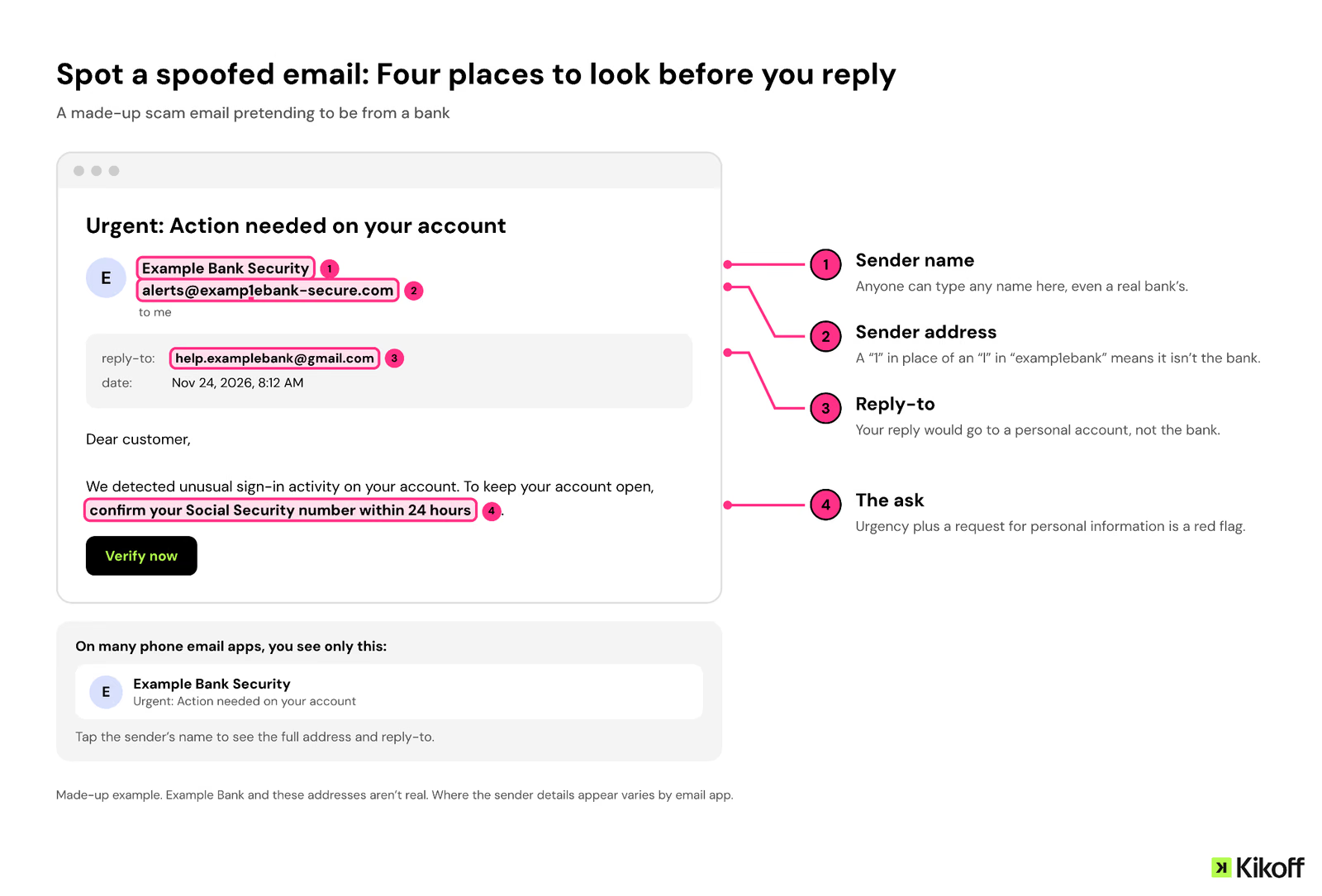
A spoofed email may use a fake display name, a forged or lookalike address, or a reply-to address that sends your answer to the scammer. This made-up example shows where to look.
People told the FTC they lost $3.5 billion to imposter scams in 2025, including nearly $1 billion to scammers posing as businesses. Of those, bank impersonators caused the highest reported losses.
How to check whether an email is real
Start with the sender. Tap or click the name to see the full address, and read the part after the @ letter by letter.
Next, if you use Gmail on a computer, open the message, click More next to Reply, then click Show original. The full header shows where the message actually came from.
Then hover over any link before you click. If the web address doesn’t match the company’s real site, skip it and contact the company yourself through its app or the number on your card.
Red flags in any email, text, or call. A rush (“your account closes today”). A request to verify a password or Social Security number. An alert telling you to move money to protect it. A demand for gift cards, wire transfers, or crypto.
The free check: Hang up and call the company back at a number you already trust, like the one on your card.
What is call spoofing?
Call spoofing, also called caller ID spoofing, is when a caller fakes the name or number that shows up on your phone. A scam call can display your bank’s name, a government agency, or a number with your area code.
Spoofing isn’t illegal in every case. Federal law makes it illegal to fake caller ID on calls or texts to defraud you, cause harm, or wrongfully get something of value. Penalties can reach $10,000 for each violation.
When a call seems off:
- Hang up, even if the caller ID shows a name you know.
- Call back using the number on your card, your statement, or the company’s official website.
- If it’s a robocall, don’t press any numbers to reach an operator or get off the list. That keeps you on the line with the scammer.
What to do if you already responded
Scam messages are built to look real. What to do next depends on what you shared.
- You clicked a link or opened an attachment. Update your security software, run a scan, and remove anything it flags.
- You entered a password. Change it now, plus any other account that uses the same one. Turn on two-step verification so a stolen password alone can’t get someone in.
- You gave a card or bank number, or sent money. Call your card company or bank right away, using the number on the back of your card, and ask it to reverse the payment. The FTC has steps for gift cards, payment apps, and other payment types.
- You shared your Social Security number. Report it at IdentityTheft.gov to get a free recovery plan. Then protect your credit, in this order.
First, place a free fraud alert by contacting one of the three credit bureaus. That bureau has to tell the other two. An initial alert lasts one year. If someone has already used your information, an FTC Identity Theft Report lets you place an extended alert, which lasts seven years.
Next, freeze your credit with Equifax, Experian, and TransUnion. A freeze is free to place and lift, and it lasts until you lift it.
After that, get your free credit reports every week at AnnualCreditReport.com and look for accounts or inquiries you don’t recognize. An account someone opened in your name is an error, and you can dispute it with the credit bureau for free. Kikoff’s AI Credit Disputes, free for all Kikoff users, can help you dispute inaccurate items with a few taps.
Where to report spoofing
Bottom line
Spoofing fakes what you see, so trust the company’s real contact details over anything in the message. Reporting a spoofed email or call deals with that message. It can’t show you whether someone used your details to open an account somewhere else. Kikoff Basic includes weekly credit monitoring focused on one bureau, so you can keep watch on your credit report after a scare. Plans start at $5 a month.
Frequently Asked Questions
Article Sources
Disclaimer: The information provided in this blog post is meant for informational purposes only and does not constitute financial advice.