



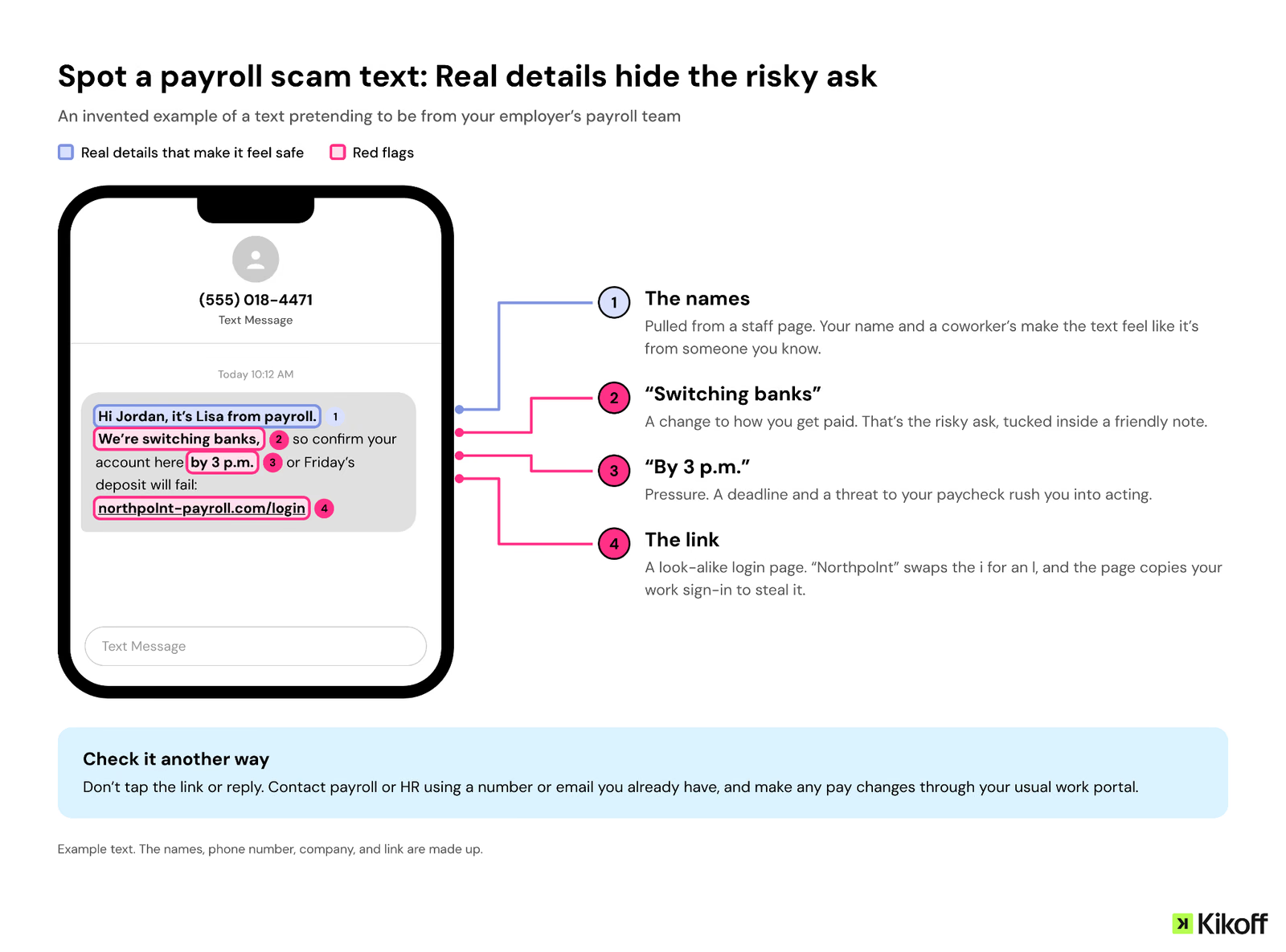
Spear phishing is a scam message written for one person. Instead of a generic “your account is locked” email, it uses details about you, like your name, your boss, your bank, or a package you’re expecting. Those details are why careful people respond to it. If you already clicked or shared information, every step to protect yourself is free, and the sooner you take them, the less a scammer can do with what they got.
How spear phishing differs from regular phishing
Regular phishing sends the same fake message to as many people as possible. Spear phishing aims at one person or a small group. The scammer researches you first, then writes a message that fits your life.
It can arrive by email, text, phone call, or social media message. When the target is an executive, it’s often called whaling. AI tools also help scammers clean up grammar or imitate a relative’s voice on a call, so a message with no typos isn’t proof it’s safe.
Where scammers get your details
Most of what goes into a spear phish is already out there:
- Data breaches. Your email, phone number, or old passwords may be sold after a company you used is hacked.
- Social media. Job updates, vacation photos, a pet’s name, or a tagged family member.
- People-search sites. Data brokers that list your address, phone number, and relatives.
- Your workplace. Staff pages that show who you report to and who handles payments.
You can shrink that trail. Set your social accounts to private, post trip photos after you’re home, and search your name on people-search sites. Use each site’s opt-out form to ask it to remove your listing.
Signs a message is a spear phish
A spear phish gets the small details right, so focus on what it asks you to do. Slow down if a message:
- Pushes you to act fast or keep it quiet
- Asks for a password, a code texted to your phone, your Social Security number, a wire, gift cards, or crypto
- Changes how you pay or get paid, like “new bank details for this invoice” or “update your direct deposit”
- Uses an address, number, or link that’s slightly off from the real company’s
- Comes from “your boss” or “your grandchild” who can’t talk by phone but needs money now
Check it yourself. Skip the link, phone number, and reply button in the message. Reach the company or person on your own, through the number on your card, the company’s official app, or a contact saved in your phone, and ask whether they sent it. A real request will still be there when you call back.
What to do if you clicked or replied
You can still limit what a scammer does next. The FTC’s steps for scam victims depend on what you shared. Work through them in this order. Each one is free.
- Clean up your device if you clicked a link, opened an attachment, or let someone access your computer. Update your security software, run a scan, and delete anything it flags. Then change your passwords.
- Lock down any account you shared. If you can still log in, create a new, strong password and turn on two-factor authentication. Change that password anywhere else you used it.
- Call your bank or card company if money or account numbers are involved. Use the number on your card or statement, and ask them to reverse any payment you sent.
- If you gave your Social Security number, go to IdentityTheft.gov. If someone used it, report it at IdentityTheft.gov to get a personalized recovery plan. If it hasn’t been used or you’re not sure, follow the FTC’s data breach steps. To report in a language other than English, call 877-438-4338 and press 3.
- Put a freeze or fraud alert on your credit. Both make it harder for someone to open new credit in your name, and both are free.
- Check your credit reports. Get them free every week at AnnualCreditReport.com, and look for accounts, addresses, or hard inquiries you don’t recognize. Checking doesn’t affect your credit. If you find an account you didn’t open, dispute it for free with the credit bureau and the company that reported it. Disputes correct inaccurate information only. Kikoff’s AI Credit Disputes, free for all users, can help you dispute inaccurate items with a few taps.
- Report the message, even if you didn’t lose money. Forward phishing emails to the Anti-Phishing Working Group at reportphishing@apwg.org, forward texts to SPAM (7726), and report the scam at ReportFraud.ftc.gov. If you lost money online, also file with the FBI at ic3.gov. If it came to a work account, tell your IT team.
At a glance: Credit freeze vs. fraud alert
Bottom line
Spear phishing uses real details about you, so check any unusual request through a contact you find yourself. If you already responded, the free steps above handle what you know about today. The less of your information is out there, the less a scammer has to work with, but opting out of people-search sites one at a time takes a while. Kikoff’s Privacy Protection, included with Kikoff Ultimate, focuses on data brokers and exposed personal information, at $35 a month.
Frequently Asked Questions
Article Sources
Disclaimer: The information provided in this blog post is meant for informational purposes only and does not constitute financial advice.