



Account takeover fraud is when a thief gets into an account you already have, such as your email, bank account, payment app, or phone plan, and acts as you. They might move money out, shop with your saved card, or change the password so you can’t get back in.
If something already looks off, speed counts. Federal rules limit what you owe for charges and transfers you didn’t make, and the limits are smallest when you report right away.
Account takeover vs. new account fraud
Account takeover uses an account you opened. New account fraud is when someone uses your personal information to open a credit card or loan you never applied for. Both are identity theft, and one can lead to the other. A thief in your email may find tax forms or your Social Security number, then apply for credit in your name.
Read more >> Common Credit Card Scams (and How to Avoid Them)
How thieves take over accounts
Most takeovers start with a stolen or guessed login, not a high-tech break-in.
Warning signs of account takeover
Thieves often work quietly first, switching off alerts or changing contact details before they move money. Check right away if you see:
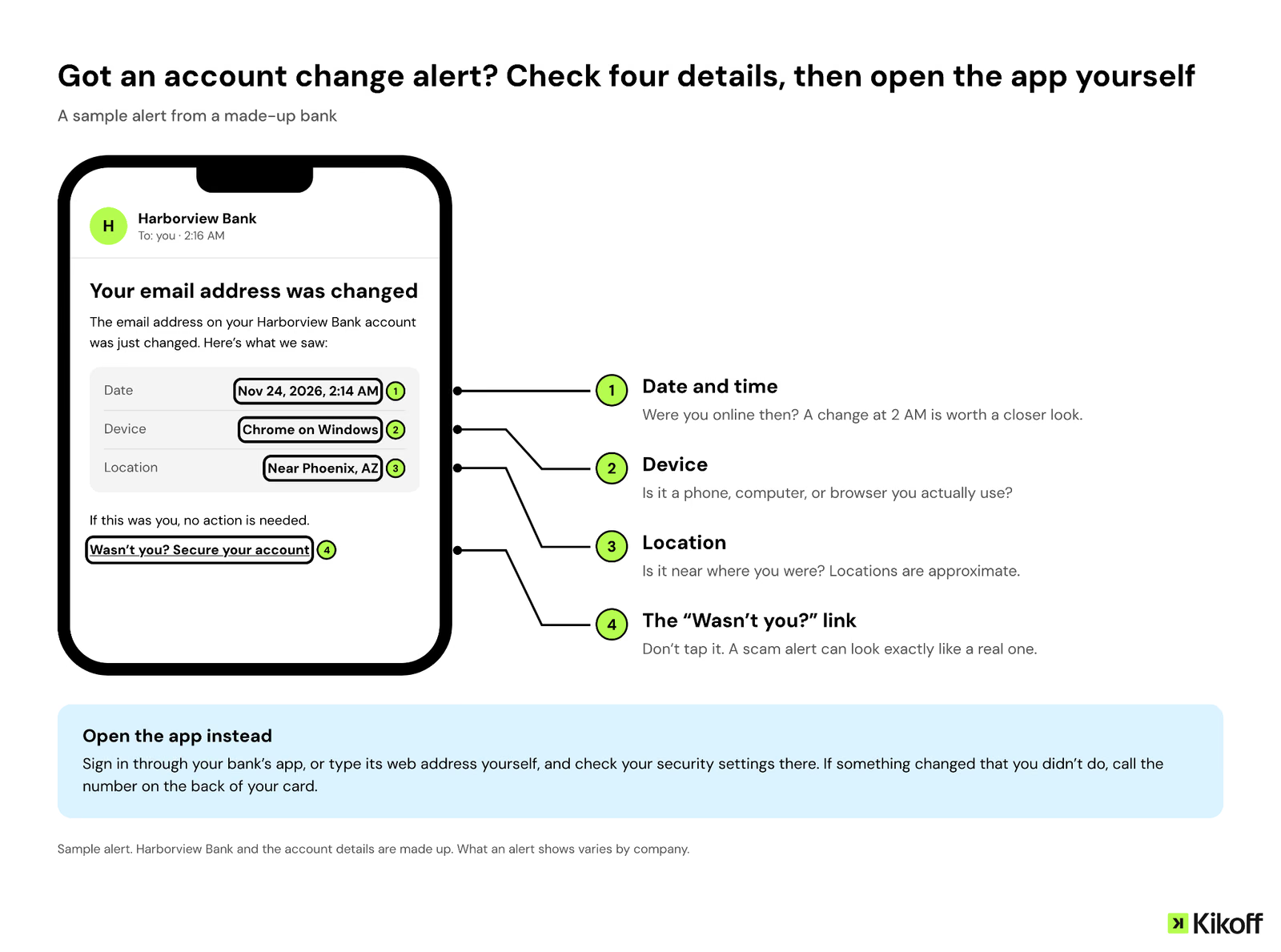
- A notice that your password, email address, or phone number was changed
- A login code, approval prompt, or login alert you didn’t expect
- Your phone suddenly losing service, which can mean your number was moved
- New payees, linked accounts, or shipping addresses
- Charges, transfers, or orders you don’t recognize, even small ones
What to do if someone took over your account
Work through these in order.
- Secure your email first. Get back in through the provider’s official recovery page. Change the password, sign out of all devices, and turn on two-factor authentication. Check that the recovery email and phone number are still yours, and delete any forwarding rule you didn’t set up.
- Call your bank or card company at the number on your card or in the official app. For debit cards and bank transfers, if your card or PIN was lost or stolen, report within two business days and your bank can’t hold you responsible for more than $50 or the amount taken, whichever is less. After that, you could owe up to $500. If your card wasn’t lost or stolen, you aren’t responsible for unauthorized transfers you report within 60 days of the statement that shows them.
- Call your phone carrier if your service cut out. Ask whether your number was moved, and add a PIN or a lock on moving it.
- Change the password anywhere you reused it, starting with financial accounts.
If the thief could have seen your Social Security number, follow the FTC’s identity theft recovery steps:
- Call the companies where fraud happened, and ask them to close or freeze those accounts.
- Place a fraud alert and get your credit reports. A fraud alert tells lenders to confirm it’s really you before opening new credit. It’s free, and you contact one bureau, which has to tell the other two: Experian at 888-397-3742, TransUnion at 888-909-8872, or Equifax at 800-685-1111. An initial alert lasts one year, and you can renew it. Your reports are free at AnnualCreditReport.com.
- Report it at IdentityTheft.gov, or call 877-438-4338 to report by phone in your preferred language. You’ll get an FTC Identity Theft Report and a recovery plan. That report lets you place an extended fraud alert, which lasts seven years.
A credit freeze at all three bureaus goes further. It’s free, lasts until you lift it, and keeps new lenders from pulling your reports. If an account you didn’t open shows up, dispute it for free with each bureau that lists it. Kikoff’s AI Credit Disputes can help you dispute inaccurate items like that one, free for all users.
How to prevent account takeover
Start with your email, bank, and phone accounts.
- Give every account its own password, and let a password manager remember them.
- Use the strongest login option offered. The FTC calls authenticator apps safer than text-message codes, which a SIM swap can redirect, and security keys the strongest. A passkey, unlocked with your face, fingerprint, or screen PIN, leaves no password for a fake page to catch.
- Never read a login code to anyone. A caller who asks for one is trying to get into your account, even if the caller ID shows your bank’s name.
- Lock down your phone number with a carrier PIN and a block on transfers you haven’t approved.
- Turn on alerts for logins, password changes, new payees, and transactions.
Bottom line
Account takeover fraud is a thief using an account you already have. Unique passwords, app-based two-factor authentication, and a carrier PIN close most of the ways in. If one opens, securing your email and calling your bank fast limit the damage.
Locking the account back down protects that account. It can’t tell you whether the information the thief saw gets used somewhere else later. Kikoff’s Credit Monitoring checks your credit every week, so a new account or inquiry you didn’t expect is easier to catch early. Kikoff Basic includes weekly monitoring focused on one bureau, and Premium adds scores from all three. Plans start at $5 a month.
Frequently Asked Questions
Article Sources
Disclaimer: The information provided in this blog post is meant for informational purposes only and does not constitute financial advice.