



A passkey is a way to sign in without a password. Your phone, computer, or password manager creates one for a specific website or app. You unlock it the same way you unlock your phone: with your face, your fingerprint, or your screen PIN.
If you’re wondering whether the website now has your fingerprint, it doesn’t. The scan stays on your device and only tells the device it’s really you. The site gets a yes from your device and never sees a password, so there’s nothing for a scammer to talk you out of or for a data breach to leak.
How a passkey works
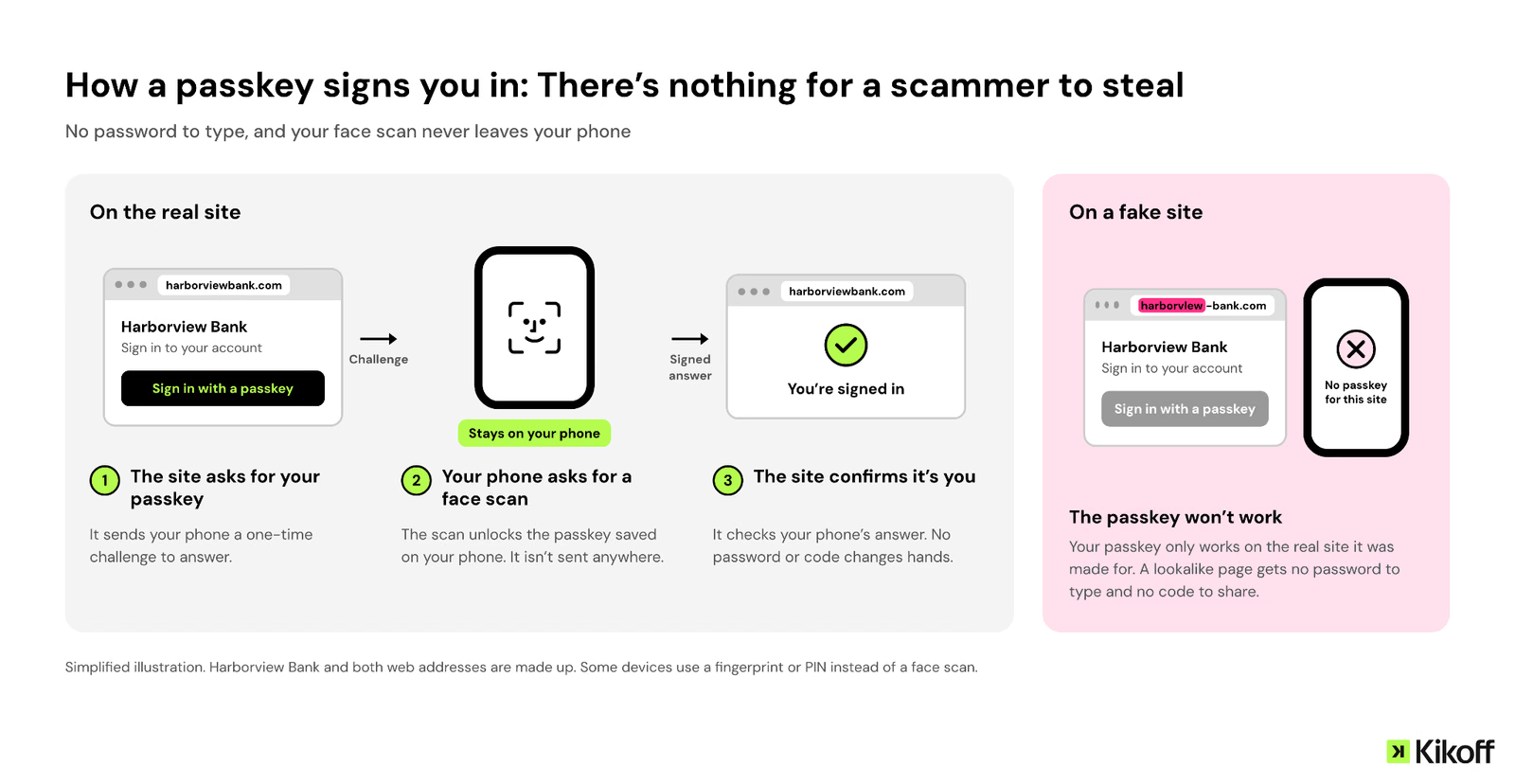
When you make a passkey, your device creates two matching digital keys. The website keeps one, the public key, which can’t sign anyone in on its own, so it’s useless to a hacker who breaks into the site. Your device keeps the other, the private key, and never sends it anywhere.
When you sign in, the site sends your device a one-time puzzle. You unlock your device, it solves the puzzle with the private key, and the site checks the answer against its half.
Each passkey is also tied to the real web address of the site that made it. If a text sends you to a look-alike page, your device won’t offer the passkey there, so you can’t hand it over by mistake.
Are passkeys safe?
For most people, a passkey is safer than a password, even one paired with a text-message code. A few weak spots are still worth closing.
- The account that stores your passkeys. Synced passkeys live in your Apple Account, Google Account, or password manager. Anyone who gets into that account could reach them, so give it a strong, unique password and two-factor authentication.
- Your phone’s screen lock. Someone who has your phone and knows your PIN could use your passkeys. Choose a PIN other people haven’t seen you type.
- Sign-in QR codes. You can use a passkey on another computer by scanning a QR code with your phone. Only scan a sign-in code you started yourself, on a screen in front of you.
Passkeys are catching on fast. More than one in three successful sign-ins used a passkey in the FIDO Alliance’s 2026 Passkey Index, up from about one in four in 2025. The index pools sign-in data from companies that offer passkeys.
Passkeys vs. security keys
A security key is a small device that plugs into a USB port or taps your phone. It’s one place a passkey can live. Most people store passkeys in their phone or password manager instead, which syncs them across their devices.
The FTC calls security keys the strongest method of two-factor authentication, because there’s no code or password for someone to steal. Federal digital identity guidelines don’t allow synced passkeys at the highest security level, since keys that sync can be copied.
If you buy a security key, buy two. Register both on each account, and keep one somewhere safe at home.
How to set up a passkey
Start with your email account. Password reset links for most of your other accounts go there.
- Sign in the usual way, then open the account’s security settings. Look for “passkeys” or “sign-in options.”
- Choose to create a passkey, and confirm with your face, fingerprint, or screen PIN.
- Check your recovery email and phone number. Make sure they’re still yours, in case you ever lose your devices.
- Change your old password anywhere you reused it, since the site may still accept it alongside the passkey.
Then move on to your bank, phone carrier, and payment apps.
If someone already got into your account
Get back in through the company’s official recovery page or app. Change the password, sign out of all devices, add a passkey, and check that the recovery email and phone number are yours. If money moved, call your bank or card company at the number on your card.
If the thief could have seen your Social Security number, follow the FTC’s identity theft recovery steps:
- Call the companies where fraud happened, and ask them to close or freeze those accounts.
- Place a free fraud alert with any one of the three credit bureaus, which has to tell the other two. It lasts one year, and you can renew it. Then get your free credit reports at AnnualCreditReport.com.
- Report it at IdentityTheft.gov to get a recovery plan and an FTC Identity Theft Report. That report lets you place an extended fraud alert, which lasts seven years.
A credit freeze at all three bureaus is also free and keeps new lenders from pulling your reports until you lift it. If an account you didn’t open shows up, dispute it for free with each bureau that lists it. Kikoff’s AI Credit Disputes can help you dispute inaccurate items like that one.
Read more >> Common Credit Card Scams and How to Avoid Them
Bottom line
A passkey replaces your password with a key your device keeps, and it works only on the real site, so phishing pages and data breaches have nothing to take.
A passkey protects how you sign in from now on. It can’t pull back personal information that leaked in an earlier breach, like your Social Security number, which someone could use to apply for credit in your name. Kikoff’s credit monitoring checks your credit every week, so a new account you didn’t open is easier to catch early. Kikoff Basic includes weekly monitoring focused on one bureau, and Premium adds scores from all three. Plans start at $5 a month.
Frequently Asked Questions
Article Sources
Disclaimer: The information provided in this blog post is meant for informational purposes only and does not constitute financial advice.