



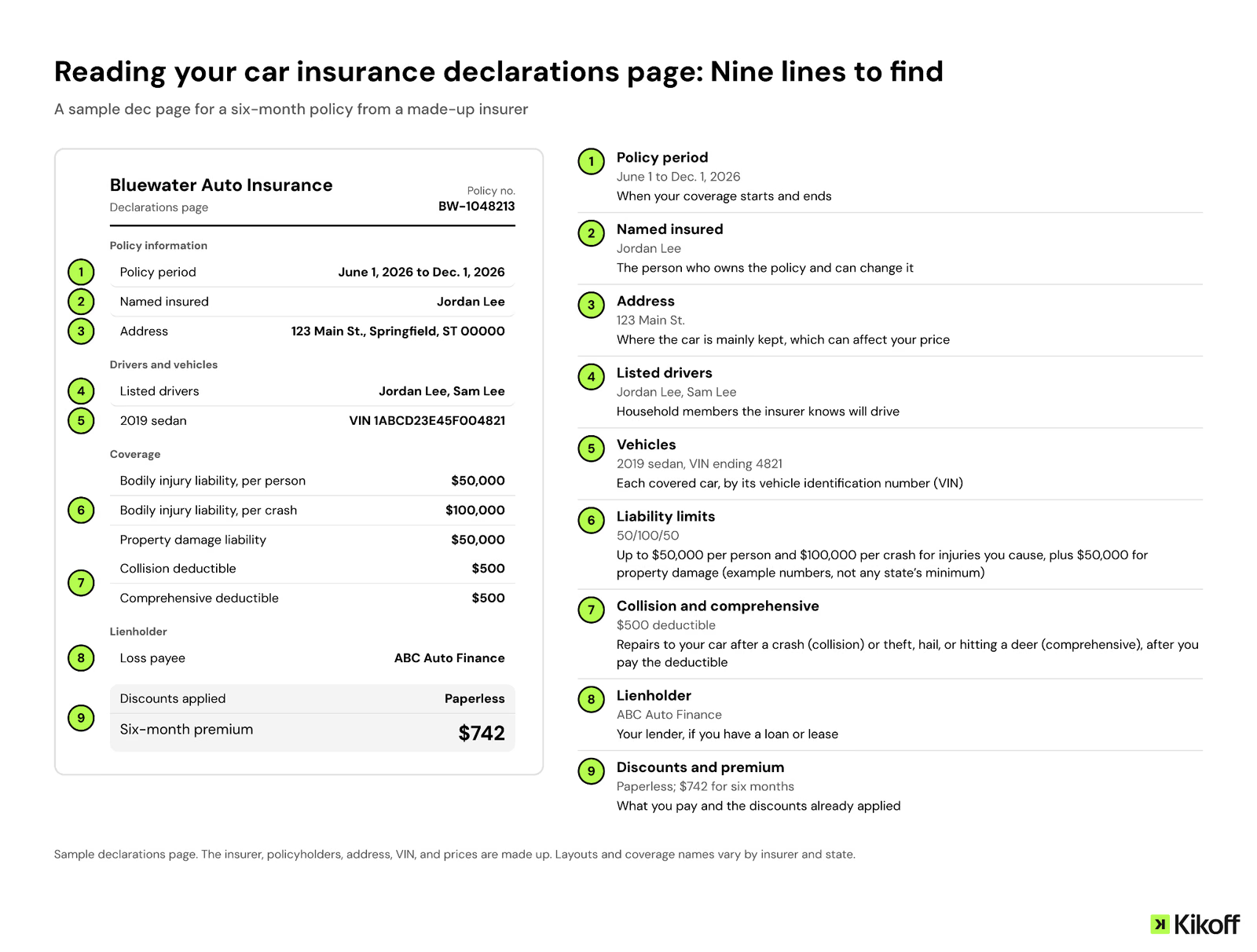
A car insurance declaration page, often called a dec page, is the summary at the front of your auto policy. In a page or two, it shows who’s insured, which cars are covered, what coverage you bought, your limits and deductibles, and what you pay.
If this is your first policy, you might wonder whether that page means you’re covered for anything that happens. It shows what you bought. The full policy explains how that coverage works, including what it leaves out. That makes the dec page the best place to catch a mistake before you need to file a claim.
What’s on a declaration page
Every insurer lays out its declaration page a little differently, but most include the same details. Here’s a sample so you can understand how to read each one.
Coverage rules depend on your state
Each state decides which coverages you need and the lowest limits you can carry. Some require personal injury protection (PIP), which pays your medical bills no matter who caused the crash. Others require uninsured motorist coverage, which helps if the other driver has no insurance.
Some dec pages mark which coverages your state requires. If yours doesn’t, ask your insurer which lines are required and which you chose. To check the rules yourself, find your state insurance department in the National Association of Insurance Commissioners (NAIC) directory.
A state minimum is the least you can legally carry, and it may not cover a serious crash. If the damage you cause is more than your limits, you could owe the difference. Before your next renewal, ask your insurer what higher limits would cost.
When you’ll need your dec page
You get a new dec page when you buy a policy, renew it, or change it. It usually shows up by email or mail, and it’s often in the documents section of your insurer’s app or website. If you can’t find it, call your insurer or agent and ask them to send it.
Keep it handy for these moments:
- Buying or financing a car. A lender may ask for it to confirm you have the coverage your loan requires, with the lender listed as lienholder.
- Shopping for a new policy. Your dec page lists your current limits and deductibles, so you can ask other insurers to quote the same coverage and compare prices fairly.
- Filing a claim. It shows your deductible and limits at a glance.
What to check each time you get one
Every time a new dec page arrives, start with the names. Make sure every driver in your household is listed and spelled correctly. Next, check that the address and each car’s VIN match your records. Then compare each coverage, limit, and deductible with what you asked for. Finally, look at the premium and discounts to see what changed.
What if something’s wrong? A missing driver or wrong address can cause trouble if you file a claim. Contact your insurer as soon as you can and ask for a corrected dec page in writing. If your insurer won’t correct it, you can file a free complaint with your state insurance department.
How your credit can show up in your price
Your dec page lists your premium, but not everything that went into it. In many states, your credit history can be part of that price.
Insurers may use a credit-based insurance score, built partly or entirely from your credit report. According to the NAIC, it estimates how likely you are to file a claim, and FICO estimates about 95% of auto insurers use one where states allow it. In most states, an insurer can’t use it as the only reason to raise your rate or drop your policy. Some states restrict it further, so check with your state insurance department.
If an insurer charges you more or turns you down based partly on your credit report, federal law says it must tell you and name the credit bureau that supplied the report. You then have 60 days to get a free copy from that bureau. If you spot an error, you can dispute it with the bureau for free.
Bottom line
A declaration page is the quick summary of your car insurance: who and what is covered, your limits, and your price. It doesn’t replace the full policy, and the coverage you’re required to carry depends on your state. Your credit history may affect your premium, but you won’t see it on the dec page. If you don’t have much credit history yet, Kikoff’s Credit Account reports your on-time payments to Equifax, Experian, and TransUnion, building a record in your own name. There’s no credit check to sign up. Plans start at $5 a month.
Frequently Asked Questions
Article Sources
Disclaimer: The information provided in this blog post is meant for informational purposes only and does not constitute financial advice.