







Once Social Security has your new name, changing it on your bank account takes a visit or a request. Bring along your name change document and a photo ID, sign a form, and order a new debit card and checks. Your account number typically stays the same.
Start with Social Security, because your wages and taxes are tied to that record. If your name there doesn't match the one your employer uses, your tax refund could be delayed, according to the Social Security Administration.
If you've worked hard on your credit, you won't lose that progress. Your accounts stay connected to you through details like your Social Security number, so a new name doesn't open a new credit file or erase your history.
5 steps to change your name on a bank account
Most of the legwork happens before you reach the bank: your paperwork, Social Security, and the DMV. Once those show your new name, the bank update itself usually takes one visit or one request.
1. Get your legal name change documents
Your bank needs proof that your name legally changed. That's usually a marriage certificate, divorce decree, court order, or Certificate of Naturalization showing your new name. Order certified copies from the office that issued it. Ask what each copy costs, and get an extra one or two if you can, since Social Security, the DMV, and your bank may each want to see one.
Then update your name with Social Security. It’s free, and in many cases you can start online. Once Social Security has your new name, update your driver’s license or state ID. Requirements and fees vary by state, so check with your state’s motor vehicle services before you go.
Updating Social Security is free, and you may not need to leave home. Skip any site that wants to charge you for this step. In many cases you can start online through your mySocial Security account. You keep the same number, and your new card arrives by mail in 5 to 10 business days after your request is complete.
Just married? The SSA suggests waiting until your state has recorded the marriage, which takes about 30 days in most cases.
2. Go to your bank or start the process online
Before you take time off work or pay for a ride to the branch, call your bank or check its help center. These few questions can save you a second trip:
- "Can I do this online or by mail, or do I need to come in?"
- "Do I need my new Social Security card or new ID first?"
- "If this is a joint account, does the other account holder need to sign?"
- "Does one request cover all my accounts here, like savings or a CD?"
If you have a credit card with the same bank, it may need its own request.
3. Complete the name change request form
You'll sign a form asking the bank to change the name on your account. You may also sign a new signature card, which the bank uses to match your signature on checks and forms. Bring your originals, and ask the bank to copy them and hand them back so you're not left without them. Before you leave, jot down the date and who helped you, in case you need to follow up.
4. Update your debit card and checks
Request a debit card in your new name, and ask whether you can continue using your current card until the new one arrives. If the new card has a different number, update any bills and subscriptions that charge it. A payment that bounces could cost you a fee you didn't need to pay.
Order new checks too, and ask whether you can use up your old ones.
5. Confirm the change with linked accounts
Tell your employer so your payroll records and W-2 match your Social Security record. Then run through everything connected to your account: direct deposit, autopay, and payment apps you use to send or receive money. When your next statement arrives, check that it shows your new name.
Read more >> How to Change Your Name on a Credit Card
Documents you need to change your name on a bank account
You'll typically need proof of your legal name change and a government-issued photo ID. Requirements vary by bank, so confirm the list when you call.
Not sure which ID to bring? If you have both your old and new IDs, bring both and save yourself a second trip.
How long does a bank name change take?
The whole process can take a few weeks from start to finish, most of it spent waiting on documents. The bank update is often the quickest step.
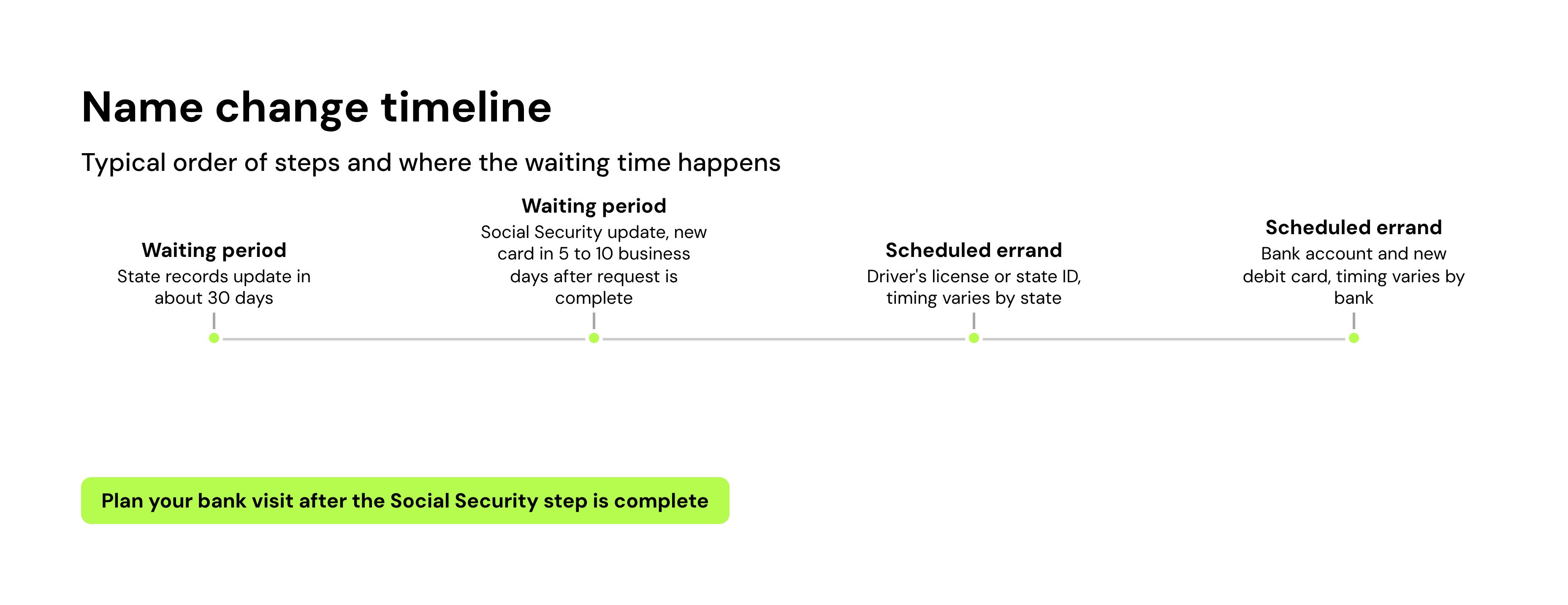
You can typically keep using your account while you wait, so your bills and paycheck don't have to go on hold. The name change doesn't move your money or reset your transaction history.
Read more >> How to Change Your Name After Marriage
What else to update after changing your name
Your bank account is one stop on a longer list. Your employer, credit card companies, lenders, insurance, and landlord all need your new name too. Our guide to changing your name after marriage has the full checklist, and most of it applies to any legal name change.
You don't need to contact the credit bureaus after a last-name change. When your lenders update their records, they report your new name to the bureaus. A full name change, such as during a gender transition, works differently, and our credit card name change guide walks through each bureau's process.
If you own a home, changing your last name doesn't necessarily mean recording a new deed. How to change the name on a house title explains when you'd need one.
Bottom line
To change your name on a bank account, update Social Security and your ID first, then bring your name change document to your bank. From there, you're updating your debit card and the accounts connected to it.
Your credit history comes with you to your new name. The bills you've paid on time from your bank account don't count toward it, though, since checking and savings accounts don't report to the credit bureaus. Kikoff's Credit Account reports your on-time payments to Equifax, Experian, and TransUnion, with no credit check to sign up. Plans start at $5 a month.
Frequently Asked Questions
Article Sources
Disclaimer: The information provided in this blog post is meant for informational purposes only and does not constitute financial advice.